

|
FhSim
3.1.0
Marine systems simulation
|
|
|
FhSim
3.1.0
Marine systems simulation
|
Class modelling the operation of danish seining.
 Collaboration diagram for Seine operation:
This class controls the operation of danish seining, by giving control input to the vessel, aswell as controlling the SeineConnector object, which is the buoy used in the operation. It controls the warp lengths, if the buoy is set and in which position, the speed of the vessel, and the desired heading of the vessel. Its input parameters define the operation.
Angles are in degrees, unlike the other objects of the library (radians). The object converts them once when it is created.
| Name | Width | Description |
|---|---|---|
| AttractorNameNet | 1 | Name of the attractor acting on the net nodes, a shared resource made by Seine/Vessel. No default; the name must exist when the model is assembled. |
| AttractorNameWarp | 1 | Name of the attractor acting on the warp nodes, the same name Seine/Vessel and Seine/Cable use. No default. The old name AttractorNameWarps still works and is logged as a warning; giving both with different values is an error. |
| InitialSpeed | 1 | The speed of the vessel before the operation is started [m/s] (Default: 4.0). |
| SetSpeed | 1 | The speed of the vessel during deployment of net and warps [m/s] (Default: 4.0). Must be finite and above zero. |
| TowSpeed | 1 | The speed of the vessel during towing, before hauling is started [m/s] (Default: 2.0). |
| HaulSpeed | 1 | The speed of the vessel during hauling [m/s] (Default: 0.5). |
| FinishedSpeed | 1 | The speed of the vessel after the operation is finished [m/s] (Default: 0.5). |
| WinchHaulSpeed | 1 | The winch speed during hauling [m/s] (Default: 0.5). Must be finite and above zero. |
| InitialHeading | 1 | The vessel heading before deployment starts [deg] (Default: 0). |
| TowHeading | 1 | The vessel heading during towing [deg] (Default: 0). The other headings of the schedule are given relative to it. |
| SpreadAngle | 1 | The angle between the two warps [deg] (Default: 60). The apex angle \(\alpha\) of the vessel track below. |
| WarpLength | 1 | The length of the warps [m] (Default: 500). Must be finite and above zero. |
| MinWarpLength | 1 | The shortest warp length when hauling [m] (Default: 20; not above WarpLength). It sets both the length the winch hauls the warps in to and, with WinchHaulSpeed, the duration of the hauling phase. |
| TowTime | 1 | The duration of the towing phase, after the second leg is set and before hauling starts [s] (Default: 100). |
| AddedTrackLength | 1 | An addition to the track length to make the net deploy at the correct time [m] (Default: 50). This corrects for the length of the net, as well as the distance the first warp is towed through the water until the net is set. |
| TensionFilterTimeConstant | 1 | The time constant tau of the filter on the bridle tensions shown in the CSV file and on the HUD [s] (Default: 10; finite and above zero). Each accepted step moves the filtered value by the fraction 1 - exp(-dt / tau) of its difference from the measurement, dt being the time since the previous accepted step; the first measurement is taken as it is. |
| TensionFilterConstant | 1 | The old form of the filter: a fixed weight per accepted step (no unit). It still works when TensionFilterTimeConstant is not given, is logged as a warning and will be removed. Giving both is an error. |
| ShowStatus | 1 | Whether a visualised run shows the operation's status on the HUD (Default: false: nothing is drawn). See "Status display" below. |
| Fileoutput | 1 | Whether the object writes a CSV file of the operation (Default: false). A caller that only assembles or checks a model and asks for no output files gets no file. |
| Outputfile | 1 | The name of the CSV file (Default: the object name followed by Out.csv). The columns are Time; Phase; Speed; Heading; WingSpread; Bridlespread; BridleTensionPrt; BridleTensionSb; NetNormalSpeed; NetTangentialSpeed. |
| FileWritePeriod | 1 | The simulation time between two rows of the CSV file [s] (Default: 1). |
Except VesselPos, which sets the buoy position, the ports feed the status display and the CSV file only. The schedule and the other outputs depend on time alone.
| Name | Width | Description |
|---|---|---|
| VesselPos | 3 | Vessel position [m], NED. The last value before the operation starts is where the buoy is set. |
| PBridleTension | 1 | Port bridle tension [N]. |
| SBridleTension | 1 | Starboard bridle tension [N]. |
| NetSWingPos | 3 | Position of the starboard net wing [m]. |
| NetPWingPos | 3 | Position of the port net wing [m]. |
| NetVel | 3 | Net velocity [m/s]. |
| PBridlePos | 3 | Position of the port bridle [m]. |
| SBridlePos | 3 | Position of the starboard bridle [m]. |
| Name | Width | Description |
|---|---|---|
| WarpConnectedVessel | 1 | 1 in the phases "Not set" and "Towing", 0 otherwise (the vessel holds the warp ends only in those two phases). Connect it to Connected of Seine/Buoy. |
| BuoyPos | 3 | The position where the buoy was set [m], NED. Down is 0. |
| VesselHeading | 1 | The commanded vessel heading of the current phase [rad]. Connect it to Heading of Seine/Vessel. |
| VesselSpeed | 1 | The commanded vessel speed of the current phase [m/s]. Connect it to Vel of Seine/Vessel. |
| PWarpLength | 1 | The port warp length [m]. |
| SWarpLength | 1 | The starboard warp length [m]. |
This simobject has no initial conditions.
Two times are relative to t = 0, not to the run's TStart (FhSim passes 0 to FinalSetup, see FISH-0120):
NetAttractorStrengthAt).With TStart of 10 s or more, the schedule is already in "Set first leg" at the start of the run and the ramp is over.
ShowStatus = "true", a visualisation build shows ten lines in the top-right corner of the HUD (fhsim::Hud), Normal style and default priority, refreshed at most every 0.2 s of simulation time: the time (s), the phase, the commanded vessel speed (m/s) and heading (deg) of the phase, the wing spread (m), the bridle spread (m), the starboard and port bridle tensions (N, after the TensionFilterTimeConstant filter), and the net's normal and tangential speeds (m/s). Numbers have one decimal, except speed and heading, which show up to four significant digits. The spreads, tensions and net speeds are computed from the input ports NetSWingPos, NetPWingPos, PBridlePos, SBridlePos (positions, expected in m), PBridleTension, SBridleTension (expected in N) and NetVel (expected in m/s); the object does not convert, so the labels hold only when the ports are connected in these units. A headless build reads the parameter and draws nothing; so does a renderer without a HUD.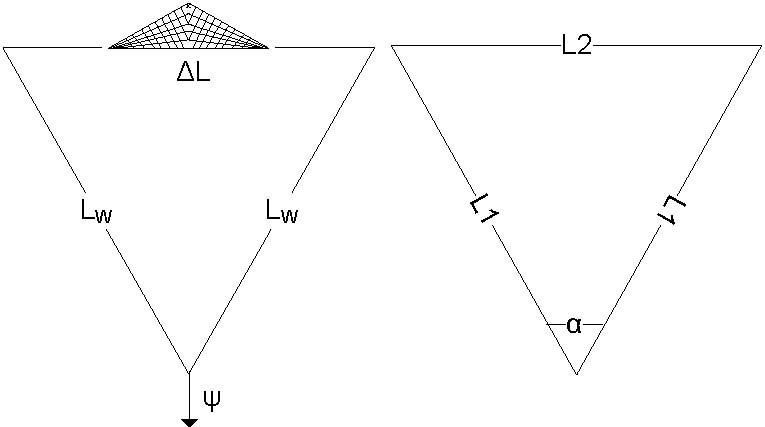
The image shows how the trajectory of the vessel is defined. Basically, the total length of the trajectory, \(L\), is found as
\[L = L1 + L2 + L1\]
, where L1 and L2 are the sides of the isosceles triangle, with apex angle \(\alpha\) at the start, that forms the path of the vessel.
Further we have that:
\[ L = L_1 + L_2 + L_1 \]
\[ L = 2L_W + \Delta L \]
\[ sin \frac{\alpha}{2} = \frac{\frac{L_2}{2}}{L_1} \]
Combining these equations, we get:
\[ L_2 = \frac{L}{1+\frac{1}{sin \frac{\alpha}{2}}} \]
\[ L_1 = \frac{L_2}{2 sin \frac{\alpha}{2}} = \frac{L - L_2}{2}\]
Using these equations, the trajectory of the vessel is found based on the input ( \( L_W, \Delta L, \psi, \alpha \) ).
The calculations of vessel heading are trivial and not explained in detail, but the headings are found based on the specified final heading and spread angle.
The example is a copy of the regression input tests/in/SeineOperation/SeineOperation_in.xml, so the two cannot drift apart silently. Seine/Cable is wired to these objects in SeineCable.xml (FISH-0017, resolved).
This SimObject is referred to as Seine/Operation
 1.9.8